> ## Documentation Index
> Fetch the complete documentation index at: https://docs.tryelixir.ai/llms.txt
> Use this file to discover all available pages before exploring further.
# Quickstart
> This quickstart helps you integrate your voice agent application with Elixir. You can start tracing your LLM requests with audio snippets.
```shell Python SDK theme={null}
pip install elixir-ai
```
You'll need an Elixir API key to use the SDK and begin logging data.
1. Create an Elixir account.
2. Create a new project.
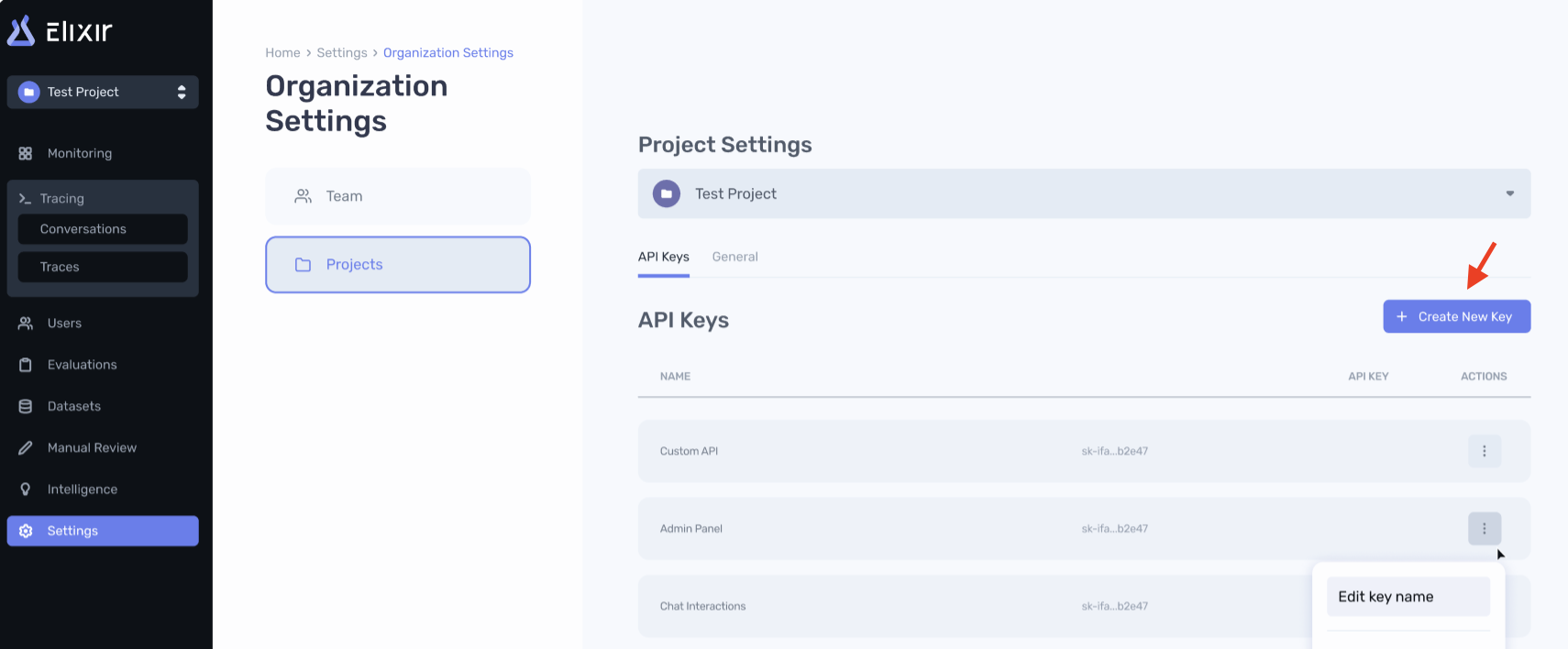
3. Navigate to project settings and issue a new API key.
 ```sh, .env theme={null}
...
ELIXIR_API_KEY=
```
1. Call `Elixir.init()` to instrument calls to your LLM services.
(This uses an OpenTelemetry-compatible tracing standard. Asynchronous instrumentation ensures this will not add latency to your service.)
```python theme={null}
# import Elixir
from elixir import Elixir
# initialize globally
Elixir.init()
```
2. Call `Elixir.track_conversation(call_id: str)` to track the current conversation and group LLM traces within. You'll need to provide a call id.
**Examples:**
```python pipecat.py theme={null}
from pipecat.frames.frames import Frame
from pipecat.processors.frame_processor import FrameDirection
from pipecat.services.openai import OpenAILLMService as BaseOpenAILLMService
from elixir import Elixir
class OpenAILLMService(BaseOpenAILLMService):
def __init__(self, session_id: str, *args, **kwargs):
super().__init__(*args, **kwargs)
self.session_id = session_id
def process_frame(self, frame: Frame, direction: FrameDirection):
# Pass conversation id here
Elixir.track_conversation(self.session_id)
return super().process_frame(frame, direction)
```
```python custom_llm.py theme={null}
@custom_llm.route("/chat/completions", methods=["POST"])
def custom_llm_openai_sse_handler():
data = request.get_json()
Elixir.track_conversation(data["call"]["id"])
```
After the call ends, use `Elixir.upload_audio(conversation_id: str, audio_url: str)` to send call recording to Elixir. This can be used in one of two ways:
1. Send a publicly accessible call recording URL.
2. Upload the file directly (if recording link is not public).
**Examples:**
```python bot_runner.py theme={null}
@app.post("/twilio_recording", response_class=PlainTextResponse)
async def twilio_recording(request: Request):
print("POST /twilio_recording")
data = {}
try:
# shouldnt have received json, twilio sends form data
form_data = await request.form()
data = dict(form_data)
except Exception:
pass
callId = data.get("CallSid")
recordingUrl = data.get("RecordingUrl")
if not callId or not recordingUrl:
raise HTTPException(
status_code=500, detail="Missing 'CallSid' or 'RecordingUrl' in request"
)
# Download the recording from Twilio
async with aiohttp.ClientSession() as session:
async with session.get(
f"{recordingUrl}.mp3?RequestedChannels=2",
auth=aiohttp.BasicAuth(TWILIO_ACCOUNT_SID, TWILIO_AUTH_TOKEN),
) as response:
if response.status == 200:
recording_content = await response.read()
content_type = response.headers.get("Content-Type")
print(
f"Recording content: {content_type}, {len(recording_content)} bytes"
)
await Elixir.upload_audio(
conversation_id=callId,
audio_buffer=recording_content,
audio_content_type=content_type,
)
else:
raise HTTPException(
status_code=500, detail="Failed to download recording from Twilio"
)
```
```python webhook.py theme={null}
async def end_of_call_report_handler(payload):
recording_url = payload.get("stereoRecordingUrl")
call_id = payload.get("call").get("id")
if recording_url:
log.info(f"Conversation ID: {call_id}, recording URL: {recording_url}")
await Elixir.upload_audio(conversation_id=call_id, audio_url=recording_url)
```
***
## Additional Resources
Learn how to use the Elixir SDK
```sh, .env theme={null}
...
ELIXIR_API_KEY=
```
1. Call `Elixir.init()` to instrument calls to your LLM services.
(This uses an OpenTelemetry-compatible tracing standard. Asynchronous instrumentation ensures this will not add latency to your service.)
```python theme={null}
# import Elixir
from elixir import Elixir
# initialize globally
Elixir.init()
```
2. Call `Elixir.track_conversation(call_id: str)` to track the current conversation and group LLM traces within. You'll need to provide a call id.
**Examples:**
```python pipecat.py theme={null}
from pipecat.frames.frames import Frame
from pipecat.processors.frame_processor import FrameDirection
from pipecat.services.openai import OpenAILLMService as BaseOpenAILLMService
from elixir import Elixir
class OpenAILLMService(BaseOpenAILLMService):
def __init__(self, session_id: str, *args, **kwargs):
super().__init__(*args, **kwargs)
self.session_id = session_id
def process_frame(self, frame: Frame, direction: FrameDirection):
# Pass conversation id here
Elixir.track_conversation(self.session_id)
return super().process_frame(frame, direction)
```
```python custom_llm.py theme={null}
@custom_llm.route("/chat/completions", methods=["POST"])
def custom_llm_openai_sse_handler():
data = request.get_json()
Elixir.track_conversation(data["call"]["id"])
```
After the call ends, use `Elixir.upload_audio(conversation_id: str, audio_url: str)` to send call recording to Elixir. This can be used in one of two ways:
1. Send a publicly accessible call recording URL.
2. Upload the file directly (if recording link is not public).
**Examples:**
```python bot_runner.py theme={null}
@app.post("/twilio_recording", response_class=PlainTextResponse)
async def twilio_recording(request: Request):
print("POST /twilio_recording")
data = {}
try:
# shouldnt have received json, twilio sends form data
form_data = await request.form()
data = dict(form_data)
except Exception:
pass
callId = data.get("CallSid")
recordingUrl = data.get("RecordingUrl")
if not callId or not recordingUrl:
raise HTTPException(
status_code=500, detail="Missing 'CallSid' or 'RecordingUrl' in request"
)
# Download the recording from Twilio
async with aiohttp.ClientSession() as session:
async with session.get(
f"{recordingUrl}.mp3?RequestedChannels=2",
auth=aiohttp.BasicAuth(TWILIO_ACCOUNT_SID, TWILIO_AUTH_TOKEN),
) as response:
if response.status == 200:
recording_content = await response.read()
content_type = response.headers.get("Content-Type")
print(
f"Recording content: {content_type}, {len(recording_content)} bytes"
)
await Elixir.upload_audio(
conversation_id=callId,
audio_buffer=recording_content,
audio_content_type=content_type,
)
else:
raise HTTPException(
status_code=500, detail="Failed to download recording from Twilio"
)
```
```python webhook.py theme={null}
async def end_of_call_report_handler(payload):
recording_url = payload.get("stereoRecordingUrl")
call_id = payload.get("call").get("id")
if recording_url:
log.info(f"Conversation ID: {call_id}, recording URL: {recording_url}")
await Elixir.upload_audio(conversation_id=call_id, audio_url=recording_url)
```
***
## Additional Resources
Learn how to use the Elixir SDK